Adding Agents From The Querier Database
To add agents already existing in Querier's database:
- Select the project from the sidebar
- Select "Agent List" in the sidebar
- Click the "Add New Agent" button
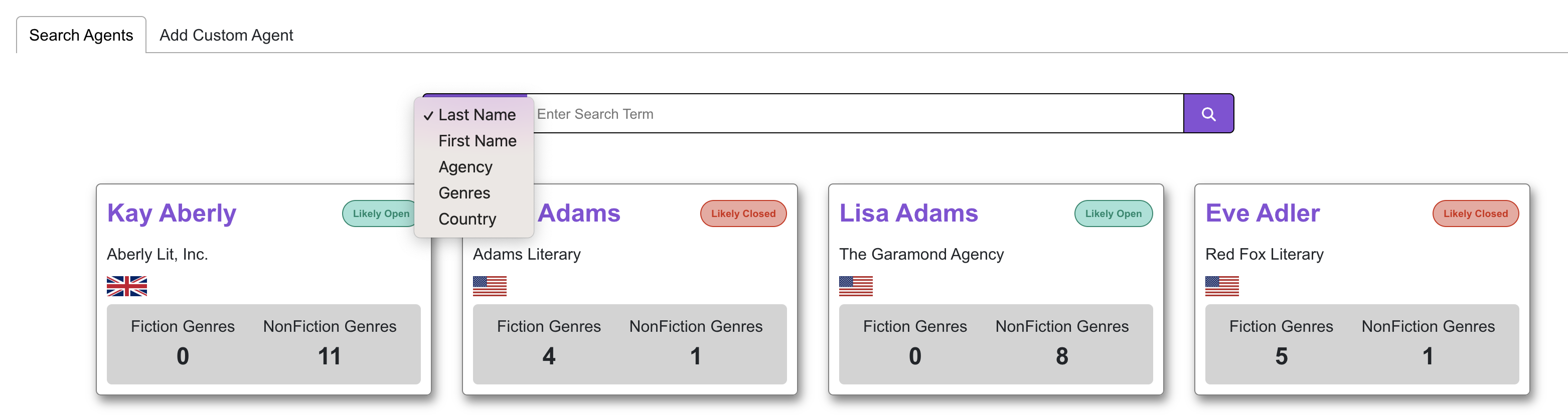
- On the search page, select the search criteria from the dropdown, enter you search term, and click the magnifying glass icon to return results (see image below)
- Search criteria include first name, last name, agency, genres, and country
- Select the agent whose profile you would like to view
- On the agent profile page:
- Review the agent's information to determine if they are a fit for your work
- If you would like to add the agent to your list, click the "Add to Agent List" button
- If you are certain the agent is not a fit for your work, click the "Add to 'Do Not Query' List." This will prevent the agent from being displayed in future searches.
Search page:
Adding Custom Agents
In addition to adding agents tracked by Querier, you can create your own custom agents. To add a custom agent:
- Select the project from the sidebar
- Select "Agent List" in the sidebar
- Click the "Add New Agent" button
- Select the "Add Custom Agent" tab
- Fill out the "New Agent" form
- Click the "Submit Agent Info" button
Was this article helpful?
That’s Great!
Thank you for your feedback
Sorry! We couldn't be helpful
Thank you for your feedback
Feedback sent
We appreciate your effort and will try to fix the article